
How to extract file(s) from a zip file
1. Click Download button
2. Once the download has completed click Save As
3. Navigate to either of these folders:
G:\QuarterMaster or
S:\QuarterMaster
If they do not exists yet in G:\ or S:\ please click “New Folder” button to create them.
4. Click Save
5. Click “Show in folder” button. Which will open the folder where the file was saved.
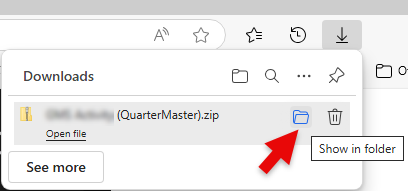
6. Right mouse click on the zip file and select Extract All…
7. Click Extract button
8. Double-click on Excel report to open it.